
Snowflake
Connect to Snowflake to manage and analyze your data warehouse workloads
Connect to Snowflake to manage and analyze your data warehouse workloads

Supports authentication: OAuth 2.0
Set up the agent connector
Section titled “Set up the agent connector”Register your Scalekit environment with the Snowflake connector so Scalekit handles the authentication flow and token lifecycle for you. The connection name you create will be used to identify and invoke the connection programmatically. You’ll need to create an OAuth Security Integration in your Snowflake account.
-
Set up auth redirects
-
In Scalekit dashboard, go to Agent Auth → Create Connection.
-
Find Snowflake from the list of providers and click Create.
-
Copy the redirect URI. It looks like
https://<SCALEKIT_ENVIRONMENT_URL>/sso/v1/oauth/<CONNECTION_ID>/callback.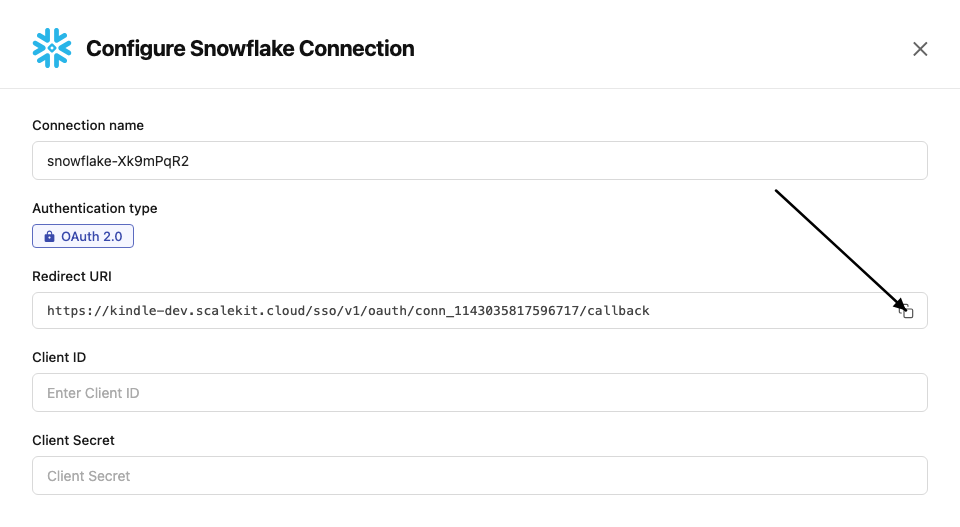
-
Log into your Snowflake account (Snowsight) and run the following SQL to create an OAuth Security Integration, replacing
<redirect_uri>with the URI you copied:CREATE OR REPLACE SECURITY INTEGRATION scalekit_oauthTYPE = OAUTHOAUTH_CLIENT = CUSTOMOAUTH_CLIENT_TYPE = 'CONFIDENTIAL'OAUTH_REDIRECT_URI = '<redirect_uri>'ENABLED = TRUE;
-
-
Get client credentials
After creating the integration, run the following SQL to retrieve the client credentials:
SELECT SYSTEM$SHOW_OAUTH_CLIENT_SECRETS('SCALEKIT_OAUTH');This returns a JSON object containing:
- Client ID — value of
OAUTH_CLIENT_ID - Client Secret — value of
OAUTH_CLIENT_SECRET_2(orOAUTH_CLIENT_SECRET_1)
- Client ID — value of
-
Add credentials in Scalekit
-
In Scalekit dashboard, go to Agent Auth → Connections and open the connection you created.
-
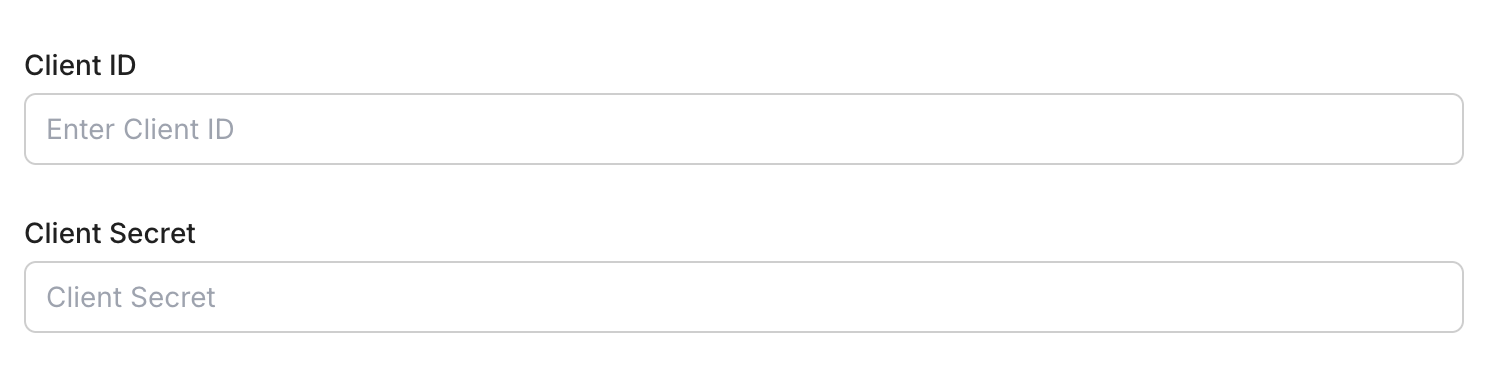
Enter your credentials:
- Client ID (from the SQL output)
- Client Secret (from the SQL output)
-
Click Save.
-
Connect a user’s Snowflake account and make API calls on their behalf — Scalekit handles OAuth and token management automatically.
import scalekit.client, osfrom dotenv import load_dotenvload_dotenv()
connection_name = "snowflake" # get your connection name from connection configurationsidentifier = "user_123" # your unique user identifier
# Get your credentials from app.scalekit.com → Developers → Settings → API Credentialsscalekit_client = scalekit.client.ScalekitClient( client_id=os.getenv("SCALEKIT_CLIENT_ID"), client_secret=os.getenv("SCALEKIT_CLIENT_SECRET"), env_url=os.getenv("SCALEKIT_ENV_URL"),)actions = scalekit_client.actions
# Authenticate the userlink_response = actions.get_authorization_link( connection_name=connection_name, identifier=identifier)# present this link to your user for authorization, or click it yourself for testingprint("🔗 Authorize Snowflake:", link_response.link)input("Press Enter after authorizing...")
# Make a request via Scalekit proxyresult = actions.request( connection_name=connection_name, identifier=identifier, path="/api/v2/statements", method="POST")print(result)Tool list
Section titled “Tool list”snowflake_execute_query
Section titled “snowflake_execute_query”Execute one or more SQL statements against Snowflake using the SQL API.
| Name | Type | Required | Description |
|---|---|---|---|
statement | string | Yes | SQL statement to execute |
async | boolean | null | No | Execute statement asynchronously and return a statement handle |
bindings | object | null | No | Bind variables object for ? placeholders in the SQL statement |
database | string | null | No | Database to use when executing the statement |
nullable | boolean | null | No | When false, SQL NULL values are returned as string "null" |
parameters | object | null | No | Statement-level Snowflake parameters as a JSON object |
request_id | string | null | No | Unique request identifier (UUID) used for idempotent retries |
retry | boolean | null | No | Set true when resubmitting a previously sent request with the same request_id |
role | string | null | No | Role to use when executing the statement |
schema | string | null | No | Schema to use when executing the statement |
timeout | integer | null | No | Maximum number of seconds to wait for statement execution (minimum: 1) |
warehouse | string | null | No | Warehouse to use when executing the statement |
snowflake_get_query_status
Section titled “snowflake_get_query_status”Get Snowflake SQL API statement status and first partition result metadata by statement handle.
| Name | Type | Required | Description |
|---|---|---|---|
statement_handle | string | Yes | Snowflake statement handle returned by Execute Query |
request_id | string | null | No | Optional request ID used when the statement was submitted |
snowflake_get_query_partition
Section titled “snowflake_get_query_partition”Get a specific result partition for a Snowflake SQL API statement.
| Name | Type | Required | Description |
|---|---|---|---|
statement_handle | string | Yes | Snowflake statement handle returned by Execute Query |
partition | integer | Yes | Partition index to fetch (0-based, minimum: 0) |
request_id | string | null | No | Optional request ID used when the statement was submitted |
snowflake_cancel_query
Section titled “snowflake_cancel_query”Cancel a running Snowflake SQL API statement by statement handle.
| Name | Type | Required | Description |
|---|---|---|---|
statement_handle | string | Yes | Snowflake statement handle to cancel |
request_id | string | null | No | Optional request ID used when the statement was submitted |
snowflake_get_schemata
Section titled “snowflake_get_schemata”Query INFORMATION_SCHEMA.SCHEMATA for schema metadata.
| Name | Type | Required | Description |
|---|---|---|---|
database | string | Yes | Database name |
schema_like | string | null | No | Optional schema pattern |
limit | integer | null | No | Maximum rows (minimum: 1) |
role | string | null | No | Optional role |
warehouse | string | null | No | Optional warehouse |
snowflake_get_tables
Section titled “snowflake_get_tables”Query INFORMATION_SCHEMA.TABLES for table metadata in a Snowflake database.
| Name | Type | Required | Description |
|---|---|---|---|
database | string | Yes | Database name |
schema | string | null | No | Optional schema filter |
table_name_like | string | null | No | Optional table name pattern |
limit | integer | null | No | Maximum number of rows (minimum: 1) |
role | string | null | No | Optional role |
warehouse | string | null | No | Optional warehouse |
snowflake_get_columns
Section titled “snowflake_get_columns”Query INFORMATION_SCHEMA.COLUMNS for column metadata.
| Name | Type | Required | Description |
|---|---|---|---|
database | string | Yes | Database name |
schema | string | null | No | Optional schema filter |
table | string | null | No | Optional table filter |
column_name_like | string | null | No | Optional column name pattern |
limit | integer | null | No | Maximum rows (minimum: 1) |
role | string | null | No | Optional role |
warehouse | string | null | No | Optional warehouse |
snowflake_get_table_constraints
Section titled “snowflake_get_table_constraints”Query INFORMATION_SCHEMA.TABLE_CONSTRAINTS.
| Name | Type | Required | Description |
|---|---|---|---|
database | string | Yes | Database name |
schema | string | null | No | Optional schema filter |
table | string | null | No | Optional table filter |
constraint_type | string | null | No | Optional constraint type filter |
limit | integer | null | No | Maximum rows (minimum: 1) |
role | string | null | No | Optional role |
warehouse | string | null | No | Optional warehouse |
snowflake_get_referential_constraints
Section titled “snowflake_get_referential_constraints”Query INFORMATION_SCHEMA.REFERENTIAL_CONSTRAINTS.
| Name | Type | Required | Description |
|---|---|---|---|
database | string | Yes | Database name |
schema | string | null | No | Optional schema filter |
table | string | null | No | Optional table filter |
limit | integer | null | No | Maximum rows (minimum: 1) |
role | string | null | No | Optional role |
warehouse | string | null | No | Optional warehouse |
snowflake_show_databases_schemas
Section titled “snowflake_show_databases_schemas”Run SHOW DATABASES or SHOW SCHEMAS.
| Name | Type | Required | Description |
|---|---|---|---|
object_type | string | Yes | Object type to show. Allowed values: databases, schemas |
database_name | string | null | No | Optional database scope for SHOW SCHEMAS |
like_pattern | string | null | No | Optional LIKE pattern |
role | string | null | No | Optional role |
warehouse | string | null | No | Optional warehouse |
snowflake_show_warehouses
Section titled “snowflake_show_warehouses”Run SHOW WAREHOUSES.
| Name | Type | Required | Description |
|---|---|---|---|
like_pattern | string | null | No | Optional LIKE pattern |
role | string | null | No | Optional role |
warehouse | string | null | No | Optional warehouse |
snowflake_show_grants
Section titled “snowflake_show_grants”Run SHOW GRANTS in common modes (to_role, to_user, of_role, on_object).
| Name | Type | Required | Description |
|---|---|---|---|
grant_view | string | Yes | SHOW GRANTS variant. Allowed values: to_role, to_user, of_role, on_object |
role_name | string | null | No | Role name (used for to_role and of_role) |
user_name | string | null | No | User name (used for to_user) |
object_type | string | null | No | Object type for on_object |
object_name | string | null | No | Object name for on_object |
role | string | null | No | Optional execution role |
warehouse | string | null | No | Optional warehouse |
snowflake_show_primary_keys
Section titled “snowflake_show_primary_keys”Run SHOW PRIMARY KEYS with optional scope.
| Name | Type | Required | Description |
|---|---|---|---|
database_name | string | null | No | Optional database name for scope |
schema_name | string | null | No | Optional schema name for scope |
table_name | string | null | No | Optional table name for scope |
role | string | null | No | Optional role |
warehouse | string | null | No | Optional warehouse |
snowflake_show_imported_exported_keys
Section titled “snowflake_show_imported_exported_keys”Run SHOW IMPORTED KEYS or SHOW EXPORTED KEYS for a table.
| Name | Type | Required | Description |
|---|---|---|---|
key_direction | string | Yes | Which command to run. Allowed values: imported, exported |
table_name | string | Yes | Table name |
schema_name | string | null | No | Optional schema name |
database_name | string | null | No | Optional database name |
role | string | null | No | Optional role |
warehouse | string | null | No | Optional warehouse |